Chapter 2: Concepts
What is kpt? #
kpt stands for Kubernetes Package Transformation. It supports the management of configuration as data (CaD).
Configuration as data is an approach to the management of configurations, including the configuration of infrastructure, policy, services, applications, among others, which comprises the following actions:
- Making configuration data the source of truth, stored separately from the live state.
- Using a uniform, serializable data model to represent the configuration.
- Separating code that acts on the configuration from the data and from the packages/bundles of the data.
- Abstracting the configuration file structure and storage from the operations that act upon the configuration data. Clients manipulating the configuration data do not need to directly interact with the storage (Git, container images).
This enables the machine manipulation of the configuration for Kubernetes and any infrastructure represented in the Kubernetes Resource Model (KRM).

Key principles of configuration as data #
There are a number of key principles to be borne in mind, with regard to configuration as data (CaD). These principles are as follows:
- Storage of secrets separately, in a secret-focused storage system.
- Storage of a versioned history of the configuration changes by change sets to bundles of related configuration data.
- Reliance on uniformity and consistency of the configuration format, including type metadata, to enable pattern-based operations on the configuration data, along the lines of duck typing.
- Separation of schemas for the configuration data from the data, and reliance on schema information for strongly typed operations and to disambiguate data structures and other variations within the model.
- Decoupling of abstractions of configurations from collections of configuration data.
- Representation of abstractions of configuration generators as data with schemas, like other configuration data.
- Finding, filtering/querying/selecting, and/or validating configuration data that can be operated on by the given code (functions).
- Finding and/or filtering/querying/selecting code (functions) that can operate on the resource types contained within a body of configuration data.
- Actuation (reconciliation of the configuration data with the live state) that is separate from the transformation of the configuration data, and is driven by the declarative data model.
- Transformations, particularly value propagation, are preferable to wholesale configuration generation, except when the expansion is dramatic (for example, >10x).
- Transformation input generation should usually be decoupled from propagation.
- Deployment context inputs should be taken from well-defined “provider context” objects.
- Identifiers and references should be declarative.
- The live state should be linked back to the sources of truth (configuration).
Components of the kpt toolchain #
The kpt toolchain includes the following components:
kpt CLI: The kpt CLI supports package and function operations, as well as deployment, either through direct apply or through GitOps. By keeping an inventory of deployed resources, kpt enables resource pruning, aggregated status and observability, and an improved preview experience.
Function SDK: Any general-purpose or domain-specific language can be used to create functions to transform and/or validate the YAML KRM input/output format. However, we provide software development kits (SDKs) to simplify the function authoring process, in Go.
Function catalog: This is a catalog of off-the-shelf, tested functions. kpt makes configurations easy to create and transform, via reusable functions. Because the functions are expected to be used for in-place transformation, they need to be idempotent.
Packages #
kpt manages the KRM resources in bundles called packages.
Off-the-shelf packages are rarely deployed without any customization. Like kustomize, kpt applies transformation functions, using the same KRM function specification. However, kpt optimizes for in-place configuration transformation rather than out-of-place transformation.
Validation goes hand-in-hand with customization. KRM functions can be used to automate both mutation and validation of resources, similarly to Kubernetes admission control.
A kpt package is a bundle of configuration data. It is represented as a directory tree containing the KRM resources using YAML as the file format.
A package is explicitly declared using a file named Kptfile. This file contains a KRM resource of type Kptfile. The Kptfile contains metadata about the package and is simply a regular resource in the YAML format.
Just as directories can be nested, a package can contain another package. This is called a subpackage.
Kptfile annotations #
The Kptfile supports annotations that control package-level behavior:
kpt.dev/bfs-rendering: When set to"true", this annotation renders the package hierarchy in breadth-first order, instead of the default depth-first post-order.kpt.dev/save-on-render-failure: When set to"true", this annotation saves partially rendered resources to disk, even when rendering fails, instead of reverting all changes. This is particularly useful for debugging render failures and is essential for programmatic package rendering scenarios, where preserving partial progress is valuable.
These annotations are read from the Kptfile of the invoked package and applied to all subpackages recursively. In case if these annotations are defined in the Kptfile of the subpackages, they are ignored. If an subpackage is rendered directly the renreded subpackages annotations will be used.
Status Conditions #
The Kptfile includes a status.conditions field that provides a declarative way to track the execution status of kpt operations. This makes package management operations observable and traceable.
When the kpt fn render command is executed, a Rendered status condition is automatically added to the root Kptfile to indicate whether the rendering operation succeeded or failed. This status is recorded only for in-place renders (the default behavior). It is not written for out-of-place modes, such as stdout (-o stdout), unwrap (-o unwrap), or directory output (-o <dir>).
On a successful render:
status:
  conditions:
    - type: Rendered
      status: "True"
      reason: RenderSuccess
On a failed render:
status:
  conditions:
    - type: Rendered
      status: "False"
      reason: RenderFailed
      message: |-
        pkg.render: pkg .:
          pipeline.run: must run with `--allow-exec` option to allow running function binaries
The status condition is recorded only in the root Kptfile, not in subpackages. The error message, in failure cases, provides details about what went wrong during the render operation.
Let us have a look at the wordpress package as an example:
kpt pkg get https://github.com/kptdev/kpt/package-examples/wordpress@v1.0.0-beta.59
You can view the package hierarchy, using the tree command:
kpt pkg tree wordpress/
Package "wordpress" (independent)
├── [Kptfile]  Kptfile wordpress
├── [service.yaml]  Service wordpress
├── deployment
│   ├── [deployment.yaml]  Deployment wordpress
│   └── [volume.yaml]  PersistentVolumeClaim wp-pv-claim
└── Package "mysql" (dependent)
    ├── [Kptfile]  Kptfile mysql
    ├── [deployment.yaml]  PersistentVolumeClaim mysql-pv-claim
    ├── [deployment.yaml]  Deployment wordpress-mysql
    └── [service.yaml]  Service wordpress-mysql
This package hierarchy contains two packages:
wordpress: This is the top-level package in the hierarchy. It is declared usingwordpress/Kptfile. This package contains two subdirectories.wordpress/deploymentis a regular directory used for organizing resources that belong to thewordpresspackage itself. Thewordpresspackage contains three direct resources in three files:
service.yamldeployment/deployment.yamldeployment/volume.yaml
wordpress/mysql: This is a subpackage of thewordpresspackage, since it contains aKptfile. This package contains three resources in thewordpress/mysql/deployment.yamlfile.
kpt uses Git as the underlying version control system. A typical workflow starts by fetching an upstream package from a Git repository to the local filesystem using kpt pkg commands. All the other commands (namely,
kpt fn and kpt live) use the package from the local filesystem, rather than the remote Git repository. It can be thought of as the vendoring used by tooling for some programming languages. The main difference is that kpt is designed to enable you to modify the vendored package on the local filesystem, and then update the package by merging the local and upstream changes.
There is one scenario where a Kptfile is implicit: you can use kpt to fetch any Git directory containing KRM resources, even if the directory does not contain a Kptfile. Effectively, you are telling kpt to treat the Git directory as a package. kpt automatically creates the Kptfile on the local filesystem to keep track of the upstream repository. This means that kpt is compatible with a
large corpus of existing Kubernetes configurations currently stored on Git.
For example, spark is essentially a vanilla directory of KRM:
kpt pkg get https://github.com/kubernetes/examples/tree/master/_archived/spark
«««< HEAD «««< HEAD Details of how to work with packages are set out in Chapter 3. #
We will go into details of how to work with packages in Chapter 3.
main ======= Details of how to work with packages are set out in Chapter 3. bba110b3d (Proofreading up to kptfile annotations.)
Local Configuration #
A package can contain resources that are used only during rendering and should not
be applied to the cluster. These are called local configuration resources.
Common examples include function configs (referenced via configPath) and helper
resources used as input to pipeline functions.
You mark a resource as local by adding the config.kubernetes.io/local-config
annotation:
metadata:
  annotations:
    config.kubernetes.io/local-config: "true"
When you deploy the package with kpt live apply, local configuration resources
are automatically filtered out. They exist in the package solely to support the
pipeline. See
Chapter 4 for how function configs use
this annotation, and the
local-config annotation reference for
full details.
Workflows #
In this section, we will describe the typical workflows in kpt. The word typical is used here because there is no single correct way of using kpt. A user may choose to use a specific command but not another. This modularity is a key design principle. However, we would still like to provide guidance on how the functionality can be used in real-world scenarios.
A workflow in kpt can be best modeled as performing some verbs on the noun package. For example, when consuming an upstream package, the initial workflow may look like this:

- Get: Use the
kpt pkg getcommand. - Explore: Use an editor or run commands, such as
kpt pkg tree. - Edit: Customize the package manually or automatically using the
kpt fn evalcommand. This may involve editing the functions pipeline in theKptfilewhich is executed in the next stage. - Render: Use the
kpt fn rendercommand.
- Get a package from upstream.
- Explore the content of the package to understand it better.
- Customize the package to suit your needs.
- Render the package. This produces the final resources that can be directly applied to the cluster. Render is a required step, as it ensures that certain preconditions and postconditions about the state of the package hold true.
This workflow is an iterative process. There is usually a tight Edit/Render loop, in order to produce the desired outcome.
You may later wish to update to a newer version of the upstream package:
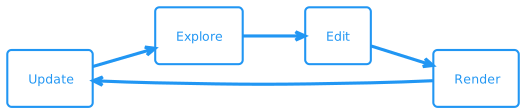
- Update: Use the
kpt pkg updatecommand.
Updating the package involves merging your local changes with the changes made by the upstream package authors between the two specified versions. This is a resource-based merge strategy, and not a line-based merge strategy used by
git merge.
Instead of consuming an existing package, you can also create a package from scratch:

- Create: Initialize a package using the
kpt pkg initcommand. This command creates the directory if it does not exist.
Let us suppose that you have rendered the package, and would like to deploy it to a cluster. The workflow may look like this:

- Initialize: This is a one-time process using the
kpt live initcommand. - Preview: Use the
kpt live apply --dry-runcommand. - Apply: Use the
kpt live applycommand. - Observe: Use the
kpt live statuscommand.
«««< HEAD
«««< HEAD
First, use the kpt live apply --dry-run command to validate the resources in your package and verify that the expected resources will be applied and pruned. If the preview looks good, then apply the package, using the kpt live apply command. Afterwards, you may observe the status of the package on the cluster.
#
First, use the kpt live apply --dry-run command to validate the resources in your package and verify that the expected resources will be applied and pruned. If the preview looks good, then apply the package, using the kpt live apply command. Afterwards, you may observe the status of the package on the cluster.
bba110b3d (Proofreading up to kptfile annotations.) ======= First, use the
kpt live apply --dry-runcommand to validate the resources in your package and verify that the expected resources will be applied and pruned. If the preview looks good, then apply the package, using thekpt live applycommand. Afterwards, you may observe the status of the package on the cluster. aa9e252df (Apply suggestions from code review)
Typically, it is best to store the package in Git:

- Publish: Use the
git commitcommand.
The publishing flow is orthogonal to the deployment flow. This allows you to act as a publisher of an upstream package, even though you may not deploy the package personally.
Functions #
«««< HEAD A Kubernetes Resource Model (KRM) function (formerly called a kpt function) is a containerized program that can perform create, read, update, and delete (CRUD) operations on KRM resources stored on the local filesystem. KRM functions are the extensible mechanism to automate the mutation and validation of KRM resources. The following are some example use cases: #
A Kubernetes Resource Model (KRM) function (formerly called a kpt function_) is a containerized program that can perform create, read, update, and delete (CRUD) operations on KRM resources stored on the local filesystem. kpt functions are the extensible mechanism to automate the mutation and validation of KRM resources. The following are some example use cases:
bba110b3d (Proofreading up to kptfile annotations.)
- Enforce all
Namespaceresources to have acost-centerlabel. - Add a label to resources based on certain filtering criteria.
- Use a
Teamcustom resource to generate aNamespaceand associated organization-mandated defaults (for example,RBAC,ResourceQuota, and so on) when bootstrapping a new team. - Bulk transformation of all
PodSecurityPolicyresources to improve the security posture. - Inject a sidecar container (service mesh, mysql proxy, logging) in a workload
resource (for example,
Deployment).
Since the functions are containerized, they can encapsulate different toolchains, languages, and runtimes. For example, the function container image can encapsulate the following:
- A binary built using kpt’s official Go software development kit (SDK).
- Wrap an existing KRM tool, such as
kubeconform. - Invoke a bash script performing low-level operations.
- The interpreter for “executable configuration”, such as
StarlarkorRego.
To astute readers, this model will sound familiar: the functions are the client-side analog to the Kubernetes controllers:
| Client-side | Server-side | |
|---|---|---|
| Orchestrator | kpt | Kubernetes |
| Data | YAML files on filesystem | resources on etcd |
| Programs | functions | controllers |
Just as the Kubernetes system orchestrates the server-side containers, the kpt CLI orchestrates the client-side containers operating on the configuration. By standardizing the input and output of the function containers, and how the containers are executed, kpt can provide the following guarantees:
- The functions are interoperable.
- The functions can be chained together.
- The functions are hermetic. For correctness, security and speed, it is desirable to be able to run functions hermetically without any privileges, thereby preventing out-of-band access to the host filesystem and networking.
We will discuss the KRM Functions Specification Standard in detail in «««< HEAD Chapter 5. At a high level, a function execution looks like this: #
Chapter 5. At a high level, a function execution looks like this:
main
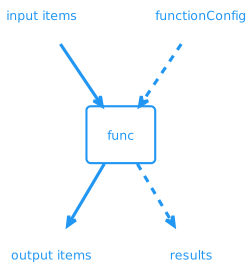
Where:
input items: This is the input list of the KRM resources on which to operate.output items: This is the output list obtained from adding, removing, or modifying items in the input.functionConfig: This is an optional meta resource containing the arguments to this invocation of the function.results: This is an optional meta resource emitted by the function for observability and debugging purposes.
Functions can be chained together in a pipeline, as illustrated here:
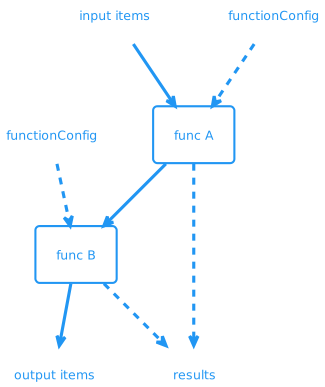
There are two different CLI commands that execute the functions corresponding to two fundamentally different approaches:
kpt fn render: This command executes the pipeline of functions declared in the package and its subpackages. This is a declarative way to run the functions.kpt fn eval: This command executes a given function on the package. The image to run and thefunctionConfigare specified as a CLI argument. This is an imperative way to run functions. Since the function is provided explicitly by the user, an imperative invocation can be more privileged and low-level than a declarative invocation. For example, it can have access to the host system.
«««< HEAD We will discuss how to run functions in Chapter 4, and how to develop functions in Chapter 5. #
We will discuss how to run functions in Chapter 4 and how to develop functions in Chapter 5. «««< HEAD
main
=======
dfe37451e (Chapter 2 proofreading.)